i'm a software engineer based in the philippines, driven by curiosity and whatever i find interesting. i learn fast with the caveat of goldfish memory (which i call my context lol) and i'm usually self-motivated that i forget to eat.
this is not like other portfolios. feel free to have a look around and explore what makes me, me.
drag empty cork to move around. drag notes to rearrange them. use +/− or pinch-wheel to zoom. click any note to open it.
i turned weeks of neuroscience papers into her memory system.
W
weave
weave gives long-running agents memory, state tracking, and retrieval that can be inspected.
current benchtypescriptagentsmemory
giving an ai agent a hippocampus
i watched a kdrama about a girl who forgets everything every morning and realized my AI agent has the same condition. so i built it a brain.
wfd · 2026-02-28T02:01:00 · 14 min
what keeps me going
someone else is on the other end.
x.com
follow me on X
from avery v3github.com
Mem0
from giving an ai agent a hippocampusarxiv.org
AI Meets Brain: Memory Systems from Cognitive Neuroscience to Autonomous Agents
from giving an ai agent a hippocampus
i'm less interested in whether it's good.
how does it work?
my focus has improved and i'm not sure why.
ideally when something is coming up, whether it's work related or it's just a personal project of mine i usually let it run at the end because i need pressure to perform things.
maywritten · 2026-06-10 · 3 min
a handdrawn chart titled day in a life showing focus changing through the daymy focus has improved and i'm not sure why.my.clevelandclinic.org
lamotrigine
from my focus has improved and i'm not sure why.
noiseshape
diffusion models
watching a photo develop.
do you want me to do that?
i built an AI agent with persistent memory. now i need to figure out if it's remembering the truth or just what i wanted to hear.
wfd · 2026-03-02T09:42:00 · 4 min
the usage of ai in daily work
AI makes me faster. It also might be making me dumber. I'm figuring out where the line is.
wfd · 2026-02-28T02:01:00 · 3 min
nytimes.com
AIinduced psychosis
from do you want me to do that?
A
atlas
atlas maps symbols, calls, tests, and history so developers and agents can ask structural questions about a repository.
current benchtypescriptsqlitemcp
Atlas: structural code-intelligence for LLM agents (an empirical evaluation)
2,239-trial benchmark across 8 OSS repos: Atlas beats a text-search baseline by +0.223 deterministic, +0.127 LLM-judge, at 42% fewer tokens.
wfd · 2026-04-19T18:00:00 · 17 min
O
orchestrator
orchestrator lets a local model read and control a live chromium page through the devtools protocol.
current benchtypescriptcdpagents
clerk is very slow
working productively in vr
going from can't-type-without-looking to a four-monitor wireless setup on a MacBook Air that only supports one display. it took switching apps, buying a better head strap, and realizing i'm bad at reading settings.
wfd · 2026-02-13T02:58:00 · 6 min
npmjs.com
React library
from exploring liquid glass for the webrogerwong.me
Breaking Down Apple's Liquid Glass
from exploring liquid glass for the webrastertek.com
Tutorial 32: Glass and Ice
from exploring liquid glass for the webimmersed.com
i can touch type. i've been doing it for years and i don't need to look at the keyboard. but the moment i put the Quest 3 on and started working in virtual desktop, my hands forgot how to do their job. that was the first problem. the second was comfort, because the stock Quest 3 setup is front-heavy and starts straining your neck after a while.
i've since solved both, but it took some trial and error with different apps and accessories to get there.
the issue is that i subconsciously look down at my keyboard while typing, even though i don't actually need to see it. on a normal monitor that glance takes a fraction of a second and i don't even register it happening. in VR there's nothing to see when i look down because the headset only shows my hands through passthrough tracking, and even that is inaccurate enough that it doesn't help.
the F and J anchors
touch typing works because of the bumps on the F and J keys. you rest your index fingers on them and everything else falls into place from muscle memory. the problem in VR is that i can't feel for those bumps with the same confidence because i'm already disoriented by not being able to see my hands properly. i end up second-guessing whether i'm on the home row, and that hesitation is enough to throw off my rhythm and cause typos.
it's not that i forgot how to type. it's that some part of my brain needs the visual confirmation even though my fingers know exactly where to go, and taking that away exposed a dependency i didn't know i had.
the virtual desktop environment
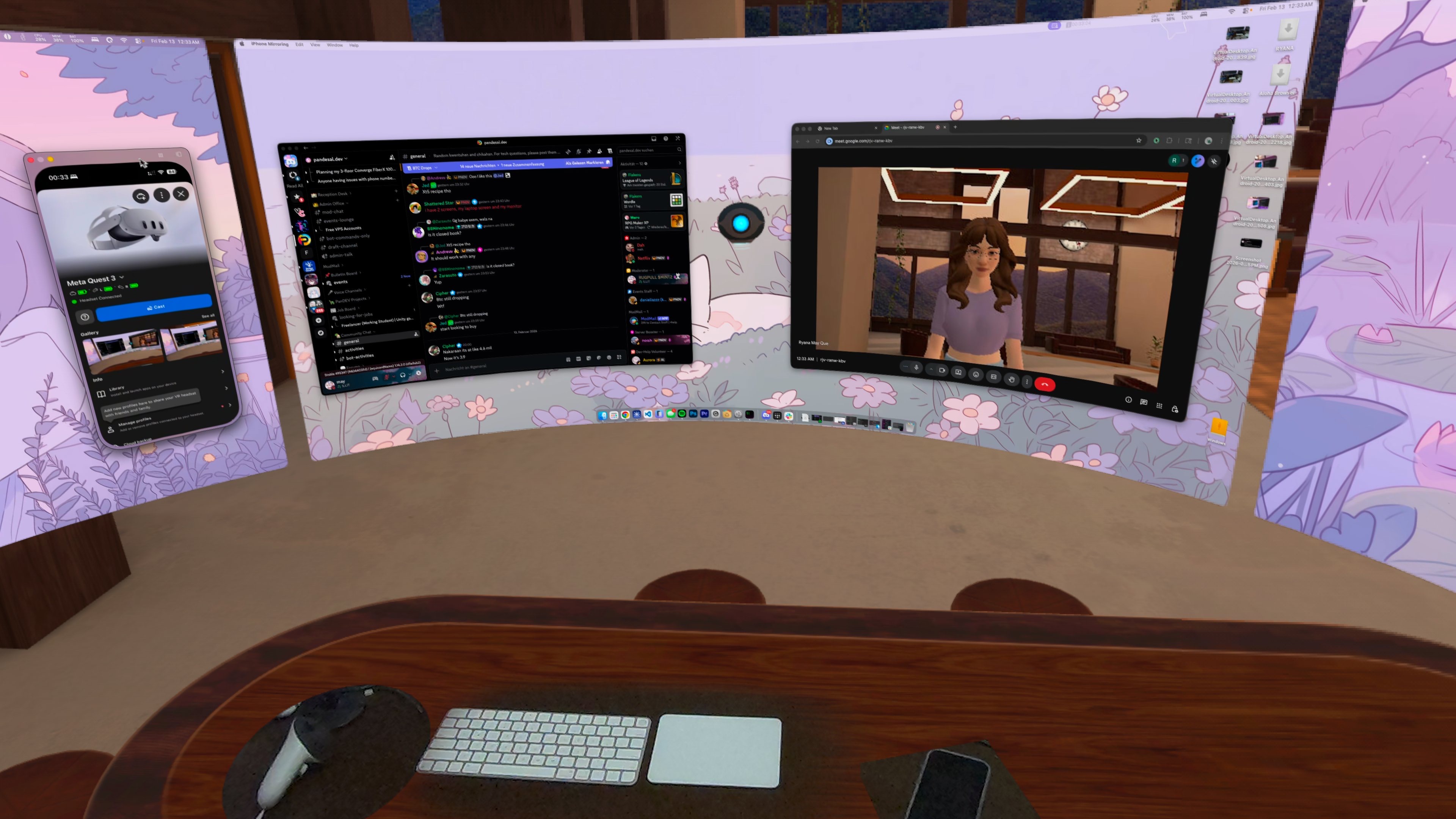
virtual desktop on the Quest 3 standalone doesn't have real keyboard tracking. there is a static keyboard model in the environment but i have to manually align my physical keyboard to it, and the alignment is never quite right. i also use a Magic Trackpad but the desk environment only has a mouse that i can't reposition, so that doesn't match either. for reference, WFD 23 has a screenshot of what this looked like.
i could probably switch to a better environment or import a custom one, but i haven't figured out how to do that yet. my ideal setup would be to somehow have this whole workflow running inside VRChat so i can be productive and social at the same time, but that's a whole other problem.
on Virtual Desktop standalone
i'm using the Quest 3 standalone version of Virtual Desktop ($24.99) and i just found out that you can't set up custom virtual environments on the standalone version. this sucks because my options are either to get a PC (i have a MacBook and a server, neither of which helps), switch to Immersed VR, or do some remote desktop setup inside VRChat for the environment. both alternatives have their own drawbacks, which also sucks because i genuinely like Virtual Desktop since it streams really nicely.
getting used to it
i think this is mostly an adaptation period. the subconscious glancing is a habit that formed over years of using physical monitors, and it'll probably go away once i spend enough time typing in VR without needing it. the muscle memory is still there because when i force myself to trust my fingers and not look down, i type fine.
the environment limitations are the bigger friction right now. a static keyboard model that doesn't match my actual setup and inaccurate hand tracking means i'm fighting the tools instead of just adjusting to the medium.
switching to immersed vr
i ended up switching to Immersed VR and it solved most of the environment problems. the image quality wasn't sharp at first and i almost wrote it off, but it turns out i was just dumb as shit because i just needed to set the encode quality to high in the settings.
now i have four 1440p monitors (one of which is an ultrawide) running at around 22ms latency, which is a lot of pixels for wireless streaming and it still feels responsive. i also figured out that you can resize the displays freely, so they're much larger than what the screenshot below shows. i do need to zoom in on some smaller text but that's a lens limitation and not a software issue. more importantly, i can set up my space so that my Apple keyboard and Apple Trackpad are both visible through passthrough. my phone is also visible, and the controllers show up through a portal that you configure in the settings.
on Immersed Pro
the higher monitor resolutions are part of Immersed Pro, which you can technically get for free by committing to a usage streak. objectively speaking i could have just done that, but i'm very impatient and just dished out $5.99 so i could fully test everything right away.
comfort
the stock Quest 3 head strap is not great for extended use. the headset is front-heavy and after an hour or so it starts pulling your neck forward, which defeats the purpose of a productivity setup you're supposed to wear for long sessions.
i swapped the strap for a BoboVR S3 Pro and used the honeycomb bottom pad on the back (which comes included) so it doesn't slip as much. i also replaced the stock faceplate with an AMVR faceplate because it's significantly more comfortable against the face. with both of these the balance of the headset is much better and it doesn't strain my neck forward nearly as much.
the split
since i'm on an M2 MacBook Air which only supports one external display natively, using Immersed VR with virtual displays has actually turned out to be more effective than any physical monitor setup i could have. four 1440p screens from a laptop that can't even drive two on its own is a genuine productivity boost, and i didn't even need to buy any hardware beyond the headset.
i'll likely be sticking with Immersed VR for productivity and Virtual Desktop for consuming media content. Virtual Desktop still streams better for video and i don't want to waste money on features i don't need in both apps.
so that pretty much concludes the VR productivity saga for now.
as a bonus, Immersed VR also has a virtual webcam that uses my Meta Horizon avatar, which you can also see in the screenshot above. that means i can take meetings with the headset on without breaking immersion or buying an actual camera and looking like goddamn Alex Murphy.